In order to not confuse yourself, it is important to know how these protocols work in an actual network environment. It is all good and well knowing the buzzwords and acronyms regarding tagging and untagging, but if you have a switch in front of you and you have no idea what to do, you need to continue reading!
TLDR (for the lazy bunch or those in a hurry): Untag for end user devices that require a specific VLAN and nothing else (PC’s/Printers), can not untag for more than one VLAN on a port. Do not get confused and think Untag means no traffic or removing a VLAN, think of it as opening the floodgates for a VLAN. Netgears and some Aruba switches require you to also change the ‘PVID’ on the port you untagged for.
Tag for VLAN aware devices such as switches for up linking, Access Points with multiple SSID’s and varying IP ranges within those SSID’s, handsets which are being used to daisy chain. Tagging is associated with trunking and is only something you would do in a complex configuration setting, not everyday use.
Tagging
In most cases, you will be untagging more than tagging because tagging is often used in more advanced scenarios such as trunking. In my experience (which is still quite junior), I have had to tag in 2 different scenarios:
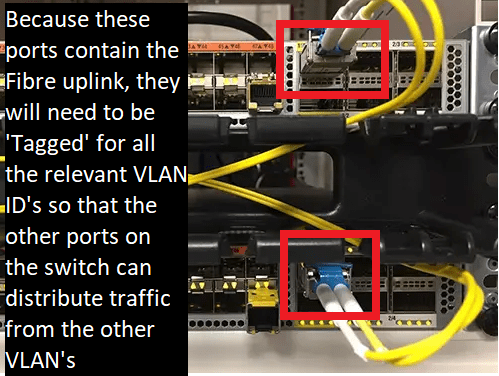
Uplink: The first time I tagged a VLAN(s), it was because I was daisy chaining the network connection from one switch to another. The reason you need to do this, is because you need to allow for all packets in all VLAN’s to traverse from one switch to another and the switch needs to be able to distribute packets from those VLAN’s to devices on the network.
For example, if I had Switch 1, which contained the fibre uplink, I would need to find a way to allow traffic to traverse from Switch 1 to Switch 2. In order to do this, you would ordinarily set up the last 2 ports on a switch to act as the ‘uplink ports’ (note that your network setup can vary, please check documentation). This allows the switch to accept packets from all VLAN’s and push out those packets from other ports on the switch. So Switch 2 Port 47 and Port 48 will be tagged for VLAN 1, 2, 3, 10, 110 and so on. Now, your Switch can act as a pathway for all the tagged VLAN’s and allows you to assign a VLAN to any other port on the switch because it now knows what those VLAN’s are. Keep in mind, however, that because the VLAN’s are Tagged, it can identify and is conscious of all VLAN’s, but does not accept traffic from those VLAN’s for its own personal use, that is where it can get confusing.
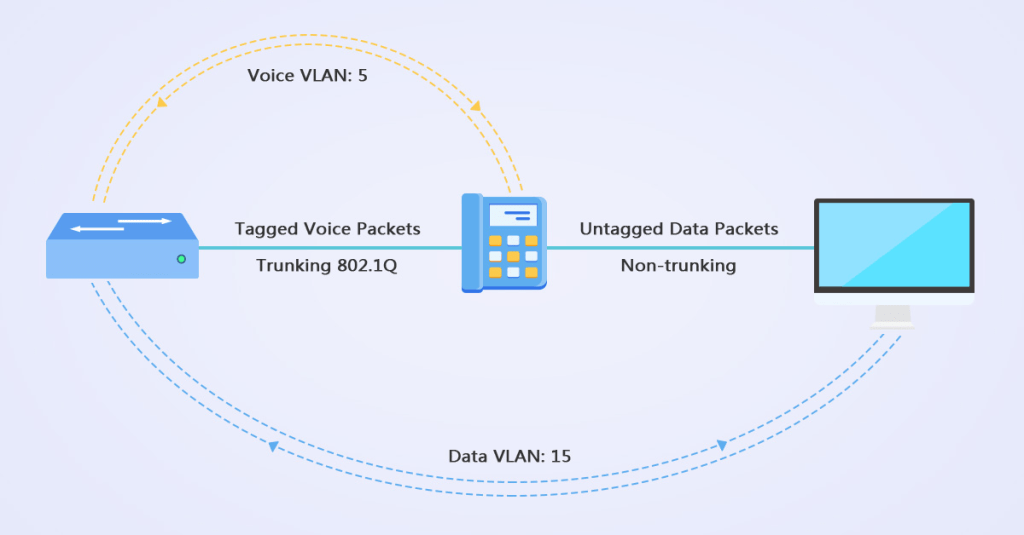
Handset Daisy Chaining: Another extremely common use of Tagging will be when you are daisy chaining a physical handset on a Users desk to their device. For most networks, your end user devices will be on a different VLAN ID to your VoIP handsets, this means you will need to use two separate ports on the wall for the handset and the users device. To circumvent this and save wall port space, you can plug a cable from the wall to the phone, and then the phone to PC. You will then need to go on the switch, ‘Tag’ for the VoIP VLAN and then ‘Untag’ for the PC’s VLAN. After, go on the handsets settings to tell it to prioritise the ‘VoIP VLAN’.

To sum it up, Tagging is used for devices that are ‘aware’ of VLANs. Switches, handsets, Access Points are all VLAN aware devices and understand what to do with ‘Tagged’ traffic. If you Tag a port on a switch that routes to a PC/Laptop for example, you won’t have much success.
Untagging
This is the more common method of switch configuration you will encounter in the world of networking because it is most associated with end user devices and their connectivity. It is less complicated than Tagging because it is quite simply “give me the traffic from that VLAN” and nothing else. This is because you can’t Untag for more than one VLAN and it is primarily something you would do when trying to get connectivity to an end user device such as a PC or printer.
The terminology itself can be confusing and misleading, those new to IT would use their common sense (this is the one scenario I would tell you not to) and think “Untagging surely means I am removing the tag of that VLAN from the port so it won’t accept that traffic” and this is completely wrong. Untagging essentially is opening the floodgates for that VLAN ID. You need to Untag because non-aware VLAN devices such as PC’s can’t differentiate between VLAN’s and will just accept the traffic that is being flooded into them.
Troubleshooting
If you are troubleshooting a network issue for a user, it is good practice to check their IP address, check the IP ranges of each of your VLAN’s and see if they are on the correct one. If they are not, you simply need to trace the port on the wall back to the switch cabinet and all the way to the specific port number on the switch. Once you have identified the port number, simply ‘Untag’ for the desired VLAN and ensure it is not ‘Untagged’ on any other VLAN’s.
It is also important to note that if you check the users IP Address and it is either empty or they have no connectivity whatsoever, this could be because their port on the wall is configured for a VLAN that only operates on a Static IP basis. You would still follow the same method above.
Leaving the port blank
I would say contrary to Tagging and Untagging, this one is quite self-explanatory. If you leave the port blank, it will not accept or identify any traffic from the VLAN whatsoever.
Any questions?
I hope the above article helped you to understand the difference between Tagging and Untagging VLAN’s. I am always open to questions or suggestions and if you think I got some stuff wrong, please do chime in because I would hate to publish incorrect information.
 IT Helpdesk solutions for Dummies
Leave a comment